· 8 min read
Say Hello To Stockify!
Your Semantic Video Tag And Search Tool
The volume of video based content we consume daily has been surging in the recent decade, no doubt about that. We could argue that most of it isn’t of the finest quality, especially with all the slop we experience firsthand through the ongoing AI revolution.
Still, I find myself in dire need of something that would let me tag and search through the vast ocean of visual information I watch. Even with emerging models that do it all and support amazing multi-modality with increasing potency (I’m looking at you Gemini 3), it is something I still find lacking.
Eventually, we could guess one would be able to get accurate timestamps of relevant tags from a YouTube video based on semantic search. But today, it is still a pricey task to perform reliably and accurately, so it doesn’t seem to be a top priority for the consumer facing agents.
The Problem
The basic use case that led me to develop Stockify, is that I often watch financial videos covering the stock market. Those tend to review several stocks, sometimes even dozens of them. And let’s say you remembered that something important was mentioned at some frame you would want to go back to. All you’re left with is to annoyingly scrub through the entire thing hoping you would end up on the relevant frame. And what if you had multiple videos you’d like to search?
YouTube still doesn’t provide you with sufficient search tools, and Gemini, while having the ability to look up a specific YouTube video to some extent, doesn’t go deep enough into the trenches most of the time. At the best case scenario you would end up with a decent summary and some timestamped markers. But that isn’t sufficient when you’re in a dire need for a deeper analysis.
The main idea is to have some sort of a db to allow ingestion, storage and querying of frames of interest. Think about it as a semantic note taking and search engine for videos, with the ability to automatically tag areas of interest in every frame.
The Original Solution
To deal with this problem, originally I built some sort of an OCR based script that solves the analysis for a certain group of videos showing a TradingView GUI. While much more economic than using an LLM, it only works in under specific conditions, where the TV logo is easily identified, as well as the stock ticker next to the “magnifying glass” icon. They also had to be in certain location with respect to each other, to reliably identify stocks. It did work reasonably well, with great accuracy levels. I did want, however, to make a solution that would much better serve a general purpose use case. And that already requires a much better semantic analysis.
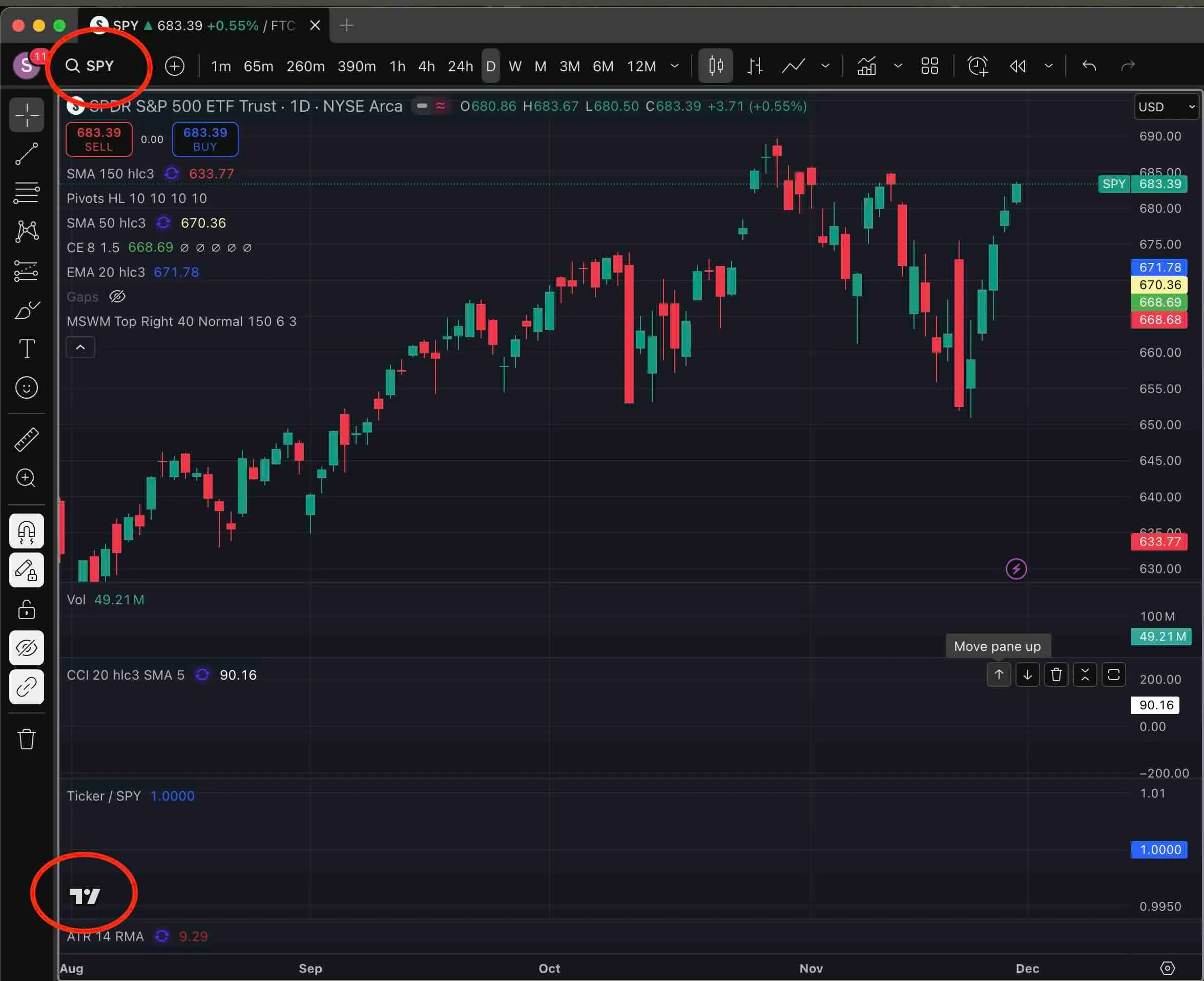 Example of TradingView interface with stock ticker identification
Introducing Stockify
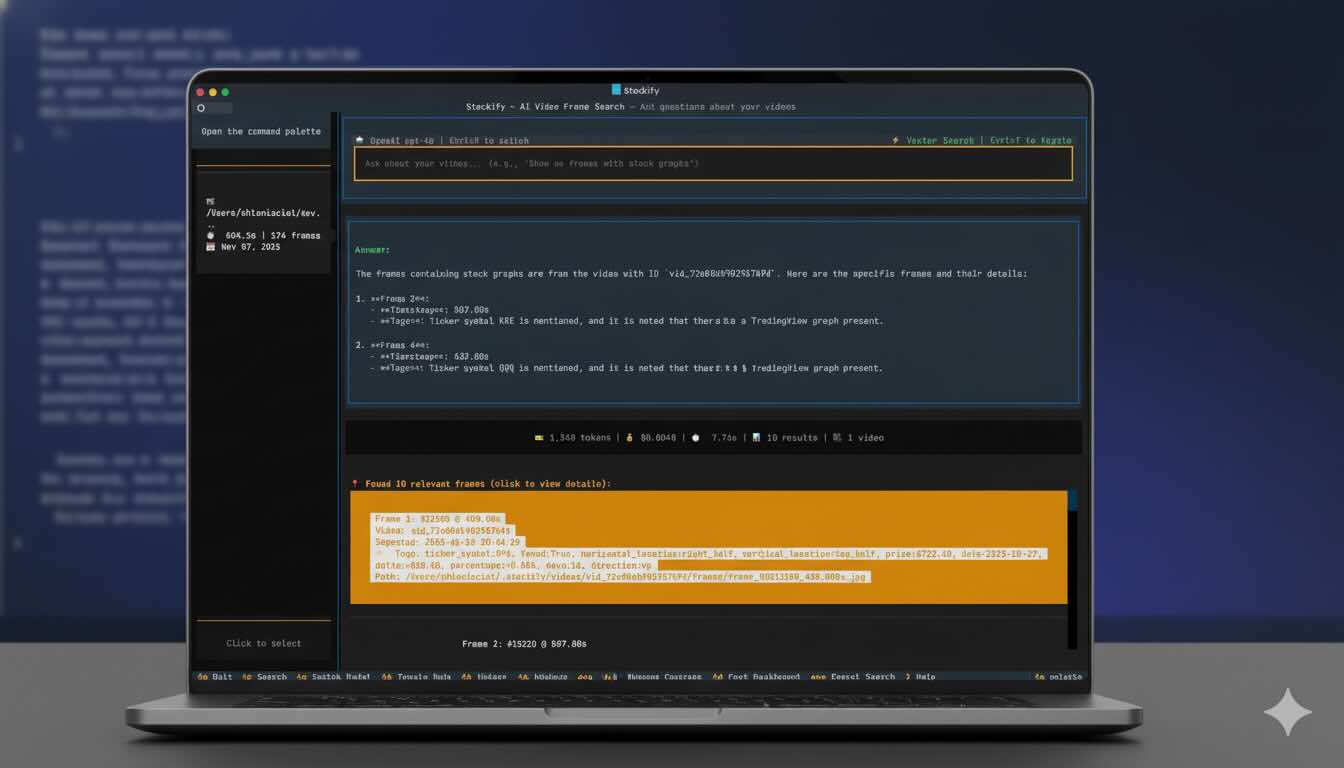
Enter Stockify - A CLI / TUI based app that allows ingestion of video files (and YouTube URLs), smart tagging and querying.
The principle is simple: take the video file, split into frames, prompt a multimodal LLM, store the result in a vector db to allow semantic retrieval. For every analyzed frame, it will also persist an OCR analysis for future reference.
For the beautiful interface the application relies on, I used the rich framework coupled with click for the CLI part, and textual for the TUI.
In order to optimize costs, Stockify doesn’t go through the entire set of frames - it uses PySceneDetect to break down the video into scenes, while letting you set the sensitivity for the detection. It also lets you choose the model, be it from OpenAI/Anthropic directly or using OpenRouter. I compiled a list of models that have been tested with varying degrees of precision and cost.
What’s the deal with the name?
By now you could probably guess the relationship between the financial origins of the specific problem I dealt with and the etymology 🙂
Since the app serves a more general purpose, the acronym STOCK stands for “Structured Tagging Optical Comprehension Kit”. Together it creates a playful twist on the meaning.
Features & Configuration
Stockify includes a rich set of parameters and filters for ingestion and tagging (see Readme):
- Allow granular analysis per frame and not scene with varying FPS
- Include the OCR text in the prompt
- Enforce a JSON schema on the output
- Set number of parallel workers
- Stop tagging after first match of the candidate frame
- Filter frames according to minimum words detected in OCR
- Set the maximum image width (resize) to cut down costs for the input frame
- Crop the input frame to the relevant quarter (if known) to cut down costs.
- Set a limit on token consumption
You have the flexibility to use either a local or remote Postgres instance to store the data.
Complete Example
Here’s a simple example to get you going with happy-flow:
# 1. Ingest video without AI tagging
stockify ingest "https://youtube.com/watch?v=VIDEO_ID"

# 2. Tag with general description
stockify tag yt_VIDEO_ID --prompt "Describe the scene, objects, and actions" --model openai

# 3. Append financial tags to frames with stock content
stockify tag yt_VIDEO_ID \
  --prompt "Extract stock tickers, chart types, and market sentiment" \
  --model openai \
  --append \
  --min-words 10 \
  --ocr-pattern "Stock|Market|Chart"

# 4. Append tags only to scene 5 where specific content appears
stockify tag yt_VIDEO_ID \
  --prompt "Identify company logos and brand names" \
  --model openai \
  --append \
  --frame-filter scene:5
The Terminal User Interface
While it is fully possible to explore Stockify’s functionality through the CLI, especially for scripting and compounding complex operations, it also sports a TUI that allows easy browsing, querying and viewing information for all videos and frames ingested. The interface design was inspired by most of the well-known chat agents, and it includes intuitive shortcuts to allow convenient access to frequent operations.

Vector Search VS Database Tools
In Stockify, the default ingestion mode saves frame analysis results into a FAISS index for later retrieval (RAG). Alternatively you can switch to “Database Tools” which provides the LLM with direct access to the Postgres DB for search and retrieval. The default method (pulling documents before the LLM sees them) is traditionally faster, more economic and more predictable for straightforward queries. Database tool (agentic retrieval) gives the LLM a way to query the database during its reasoning process. This approach is more flexible and can handle complex multi-step exploration, at the expense of higher latecy and costs.
Previewing Frames In The Terminal
Stockify renders video frame thumbnails directly in your terminal using a dual-mode approach. On modern terminals like iTerm2, Kitty, and Ghostty, it uses the term-image library to display full-resolution images via native graphics protocols (Kitty or iTerm2 inline images). For universal compatibility, it falls back to rich-pixels, which renders images using colored Unicode block characters. The --show-thumbnails=auto flag automatically detects your terminal’s capabilities, or you can explicitly choose native for high-fidelity rendering or blocks for maximum portability. Thumbnails are stored as compressed JPEG blobs in PostgreSQL and rendered through Rich’s console system, letting you visually inspect frames while searching content, reviewing AI tags, or exploring metadata without leaving the command line.
Complex Workflows
Stockify’s functionality creates fundamental building blocks that allow you to create custom, modular workflows tailored to your use case while balancing fidelity, speed, and cost. To demonstrate this, I built the analyze_tradingview workflow for the original use case that inspired Stockify: analyzing TradingView-based stock market videos. This workflow combines Stockify’s primitives: scene detection, cropping and pattern matching, OCR filtering, and selective AI tagging to extract structured data like ticker symbols and price forecast annotated on charts from financial video content. The workflow uses a multi-pass strategy for maximum efficiency. First, it ingests the entire video using scene detection at a conservative threshold to capture all potential content changes. Then it performs an initial broad tagging pass across all frames using OCR pattern filtering (--ocr-pattern "Publish") to identify frames containing TradingView content, applying a simple prompt with aggressive image cropping (--crop-quarter TL) and downscaling (--max-image-width 480) to minimize token costs. To detect TradingView based frames I also look for presence of the app’s logo. The SVG logo is directly scraped from the TV website and rastered locally. Pattern matching is used on the frame to detect its presence in different sizes on a linear scale. This first pass quickly identifies which scenes contain actionable content. Finally, the workflow performs targeted high-precision tagging using --frame-filter to focus only on specific scenes or frame ranges where tickers were detected, this time with more detailed prompts, larger image sizes, and multiple tag extractions (ticker symbols, chart patterns, sentiment indicators). By concentrating expensive AI analysis only on the relevant portions of the video, the workflow can process hours of content while keeping costs low and accuracy high. You can find the complete implementation in workflows/analyze_tradingview.py
In personal tests, I reached a cost of around $0.8 for an hour long video with high fidelity and minimal errors.
For Coarse Ingestion and initial ticker symbol detection, Anthropic’s Haiku 3 was very cost effective and did a great job, while for the price forecast detection and extraction I opted for gpt-4o which worked more reliably at a reasonable price.
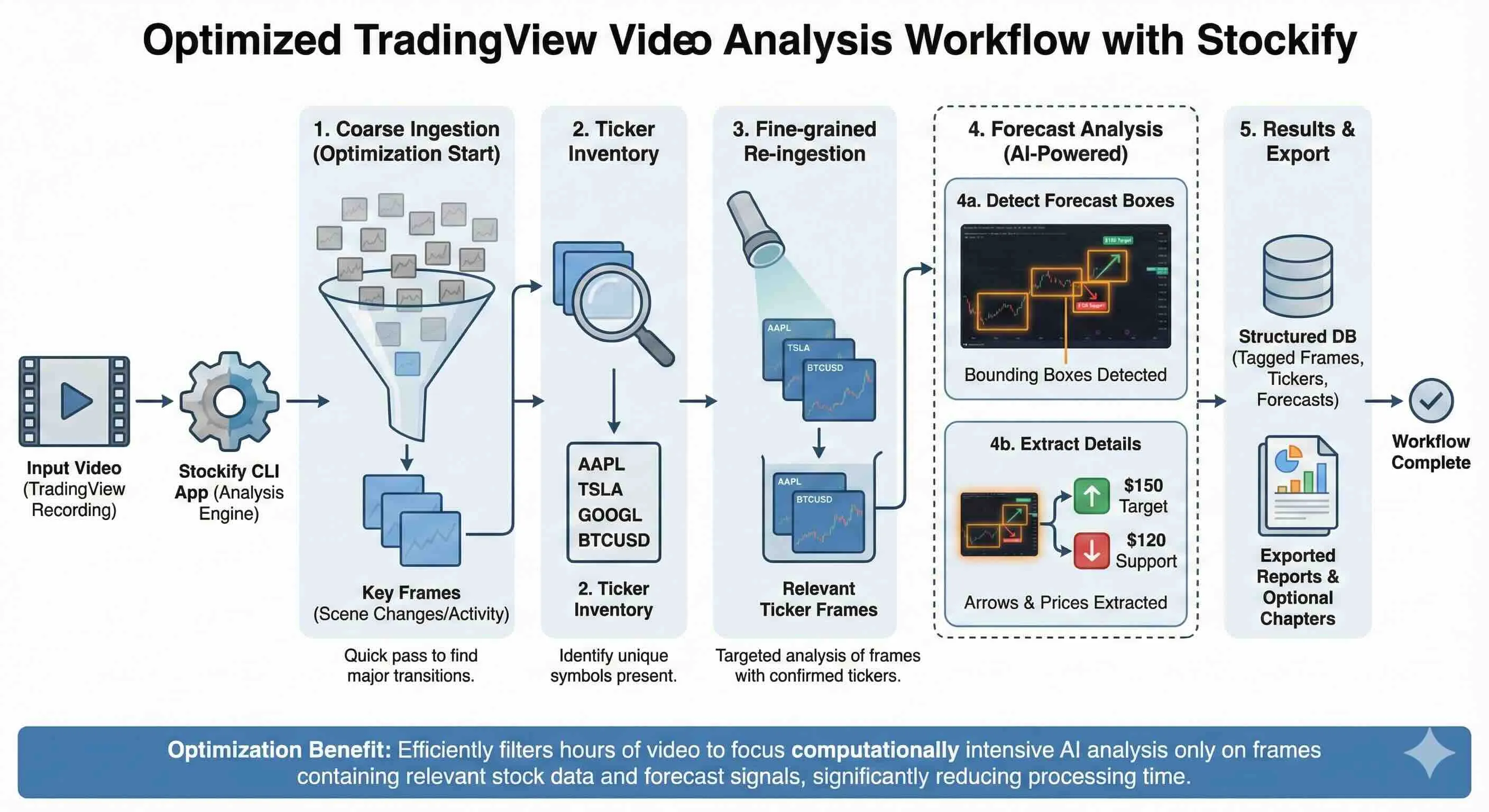
👉 Go ahead, clone, run and contribute to Stockify at: